BitzButler CRM: effortless student sign-ups and course management
What is “course”?
A course is a service provided by an instructor or coach. It can be private or group-based and focuses on teaching new skills or preparing students for certification. A course is typically an ongoing, multi-session program (a series of lessons) — for example, an 8-week jazz dance course. After completing one level, students can progress by signing up for the next. For some courses, the instructor first evaluates the student's capabilities, then works with them to set goals and create a personalized learning plan.
What is sign-up?
Sign-ups allow instructors to enroll students in classes, such as music, dance, or swimming, etc. By signing up a student, the instructor will be able to track each student's progress and current skill level. This makes it easy for the instructor to adjust the speed of coaching accordingly.
Why do we need it?
- Simplifies class management - easily schedule and organize your classes all in one place.
- The sign-up information will be used during “generating invoice” (i.e., bulk issue of invoice). Just make sure the fee and first bill date has been keyed in correctly.
- Allows analyzing the data on which course is more popular and which is less popular. This is important on the strategic planning because the market trend might change and it requires you to conduct the course that has many students.
- Easily monitor student progress and review their entire learning history.
- Easily view the number of sign-ups for any course.
Who should manage the sign-up?
For small studios, instructors or owners usually manage courses and sign-ups directly. Medium-sized studios usually hire an administrator to take care of course management and student registrations.
Can I not key in the course?
Without proper course sign-up records, instructors will have to track monthly billing manually. This is highly time-consuming and often leads to error and inaccuracies.
BizBulter CRM is here to help
The instructor may set up a new course with the following steps:
How to create a new course
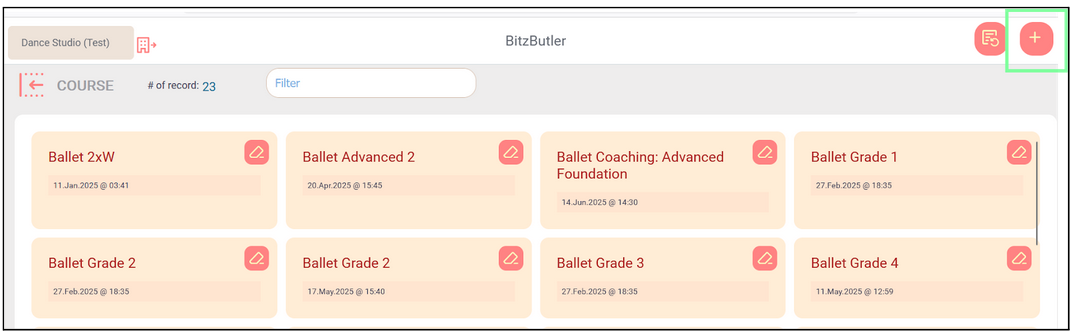
Open the app → Dashboard → Advanced → Course tab
-
Click the + button to create a new course.
-
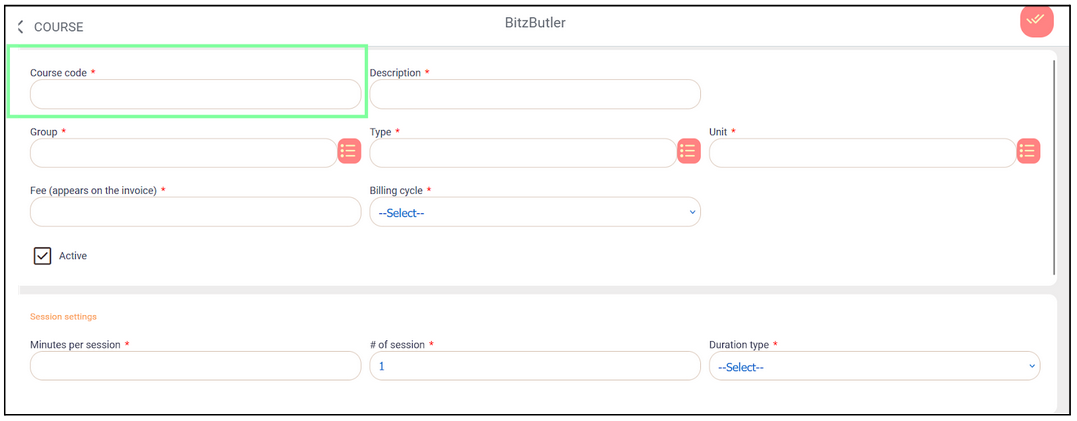
Tips for assigning a good course code:
The course code is recommended in this convention:
Main Category (3-4 letters)+ Sub Category (3 letters) + Numeric Digit
-
Main category - dancing (DAN), swimming (SWM), fitness (FIT) etc.
-
Sub-category - BLT, ELT, SOC etc. DAN-BLT - ballet class DAN-ELT - elite class DAN-SOC - social dance class SWM-BEG - beginner swimming class SWM-PRO - professional swimming for competition
-
"Numeric digit" - to indicate number of classes per week DAN-BLT-1 - once a week ballet class DAN-ELT-3 - three elite classes a week
Examples of course codes used for Design Studio: "DSG" is "design" DSG-LG - logo design. No numeric digit. DSG-SOM-1 - social media design, 1 posting a week. DSG-SOM -3- social media design, 3 postings a week. DSG-POS - poster design. No numeric digit.
You may create your own 3-letter course code as it saves your admins the trouble of assigning one.
-
-
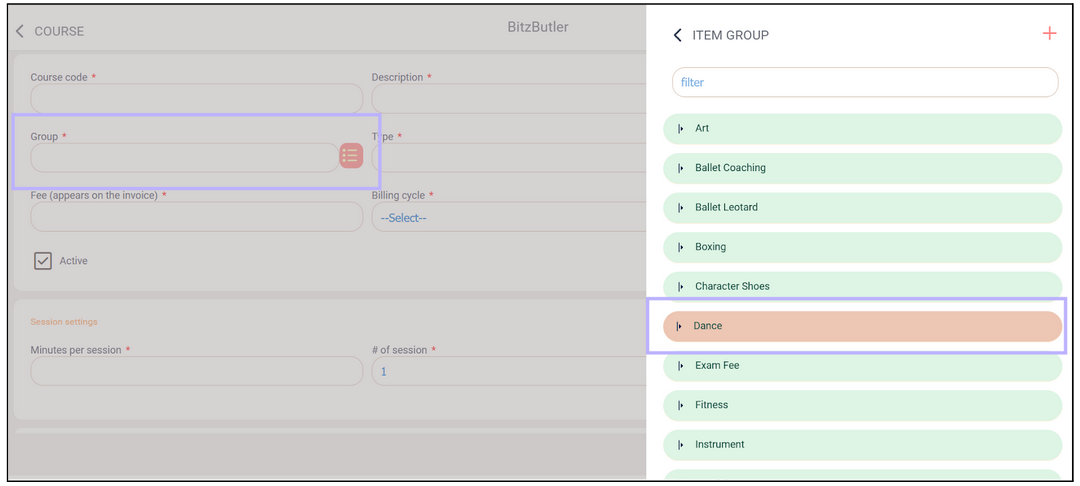
Group - select the group this course belongs to, or create a new group using the ‘+’ button.”
-
Fill in all fields marked with an asterisk (*), then click the ‘Save’ button in the top-right corner.
How to key in new sign-up
Open the app → Dashboard → Sign up→ Choose New Sign-Up option
-
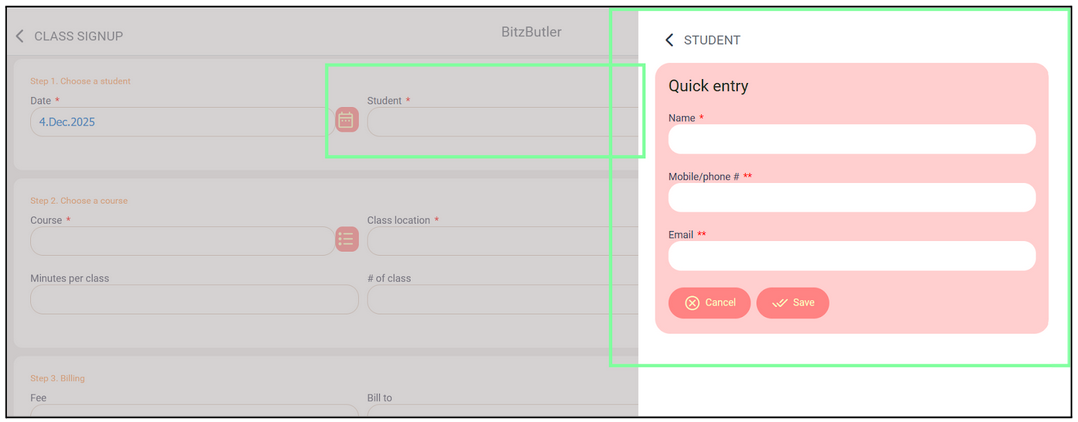
Student - To add a new student, click the ‘+’ button.
Fill in as much information as possible: Name, Mobile Number, and Email. At least one contact method (mobile or email) is required to save the form.
-
Fill in all fields marked with an asterisk (*), then click the ‘Save’ button in the top-right corner.
Example of a completed sign-up form:
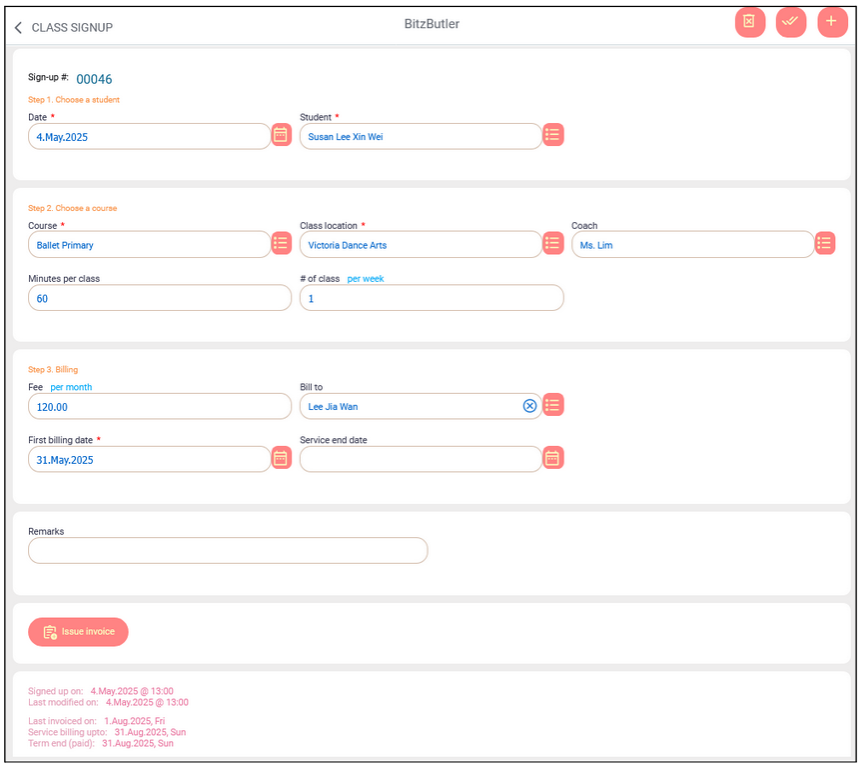
The instructor can issue the invoice as soon as the sign-up form is saved, which speeds up the invoicing process.
To view all the sign-up, open the app → Dashboard → Sign-up→ Choose Manage Sign-Up option.
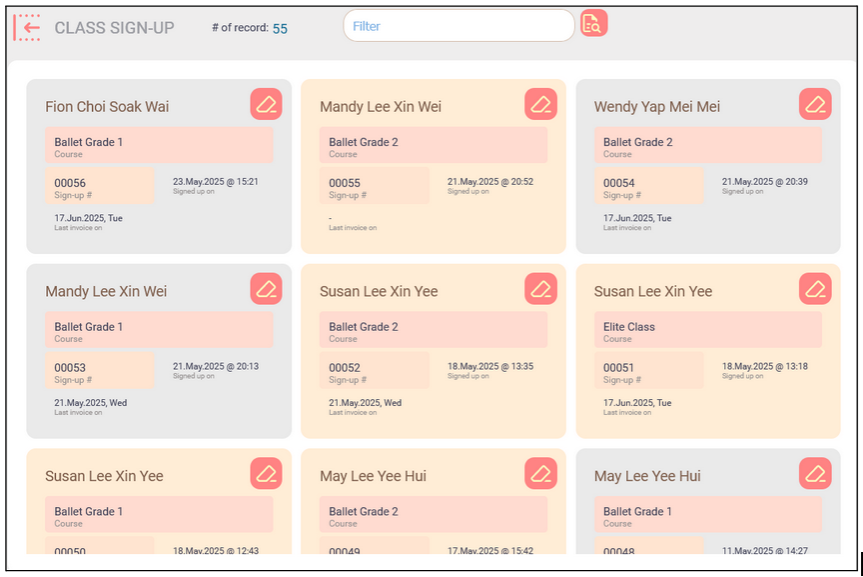
On the sign-up screen, you can perform advanced searches — for example, view all sign-ups in October 2025 or view all unbilled sign-ups in October. The advanced searches will be very helpful so that you don’t have to keep track the billing status manually.

Summary
Managing courses and sign-ups with BitzButler CRM is a smart, future-proof solution for your business. As a result, you can spend more time in the operation rather than doing the manual record keeping.
Back to #Tutorial blog
Back to #CRM blog
Back to #blog listing