BitzButler CRM: seamless asset register & accounting integration
Overview
Do you have a problem in keeping track your asset values? Or do you have any problem in finding out how much your asset has depreciated?
What is an asset register
An asset register is one of the key area in running a business. Every purchase and sale of asset must be recorded so that you will know how much you have invested (i.e., the total asset value). Because every asset has a life span, we must calculate the depreciation value and charge it out as operation cost on a yearly basis.
Whether an asset has reached its' life span or not, we might sell/dispose it. As a result, the asset has to be removed from the asset register. In this case, we call it asset disposal or just disposal. Any disposal of asset will either generate a disposal gain or loss and it must be recorded on the book as well.
All these details must be tracked in the business account so that the Trading, Profit & Loss and Balance Sheet will be able to reflect the health of a business (through the uses of accounting ratio/KPI).
This can be a tedious task since it involves many calculation throughout the years. So, keeping an accurate asset register can be very challenging.
Why do we develop Asset register
To track the asset in a spreadsheet or manually on a paper is cumbersome and error prone. As a result, we developed an Asset Register module to simplify this task. With BitzButler Asset Register module, you don't need to setup the formula like what you used to do in the spreadsheet.
BitzButler Asset register
We have moved forward one step. Our software now tracks asset values, depreciation and disposals easily.
With this new module, the user will be able to view the depreciation schedule at any time. Posting the yearly depreciation to Profit & Loss account is a finger click. And no need to use any brain power in recording the asset disposal details and finding out which account to knock off and how the disposal affects the Profit & Loss.
Here's the screenshot of asset register which shows all the assets in your business.

And the asset detail will look like this:
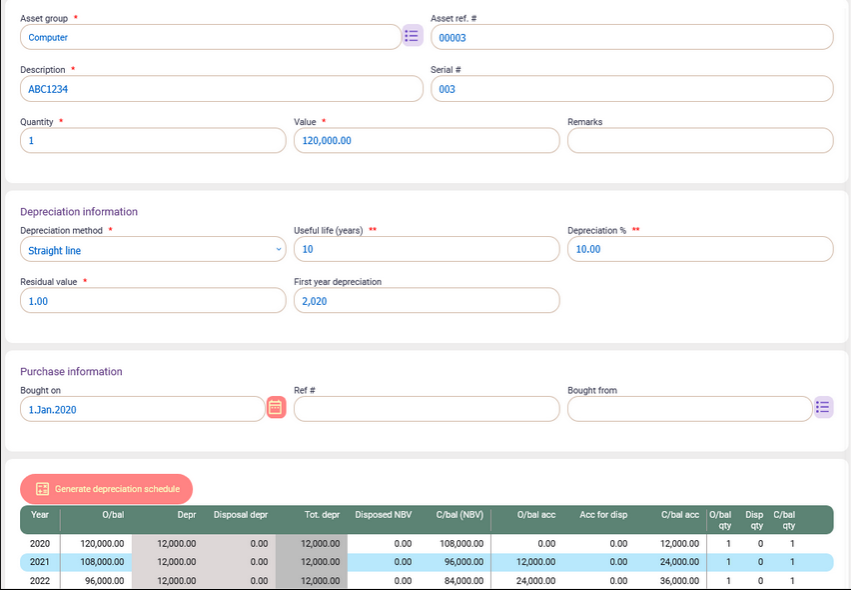
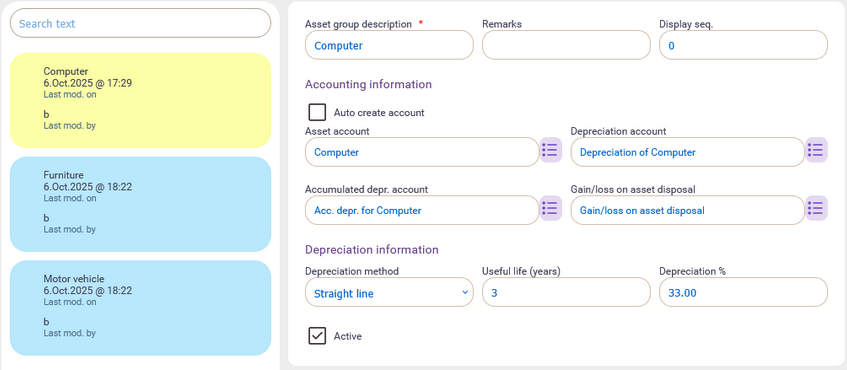
By default, the system will create the common asset group. Meaning that, upon creating your company's database in BitzButler, all these common asset groups will be created. As a result, the user does not require any in-depth knowledge in account creation or the depreciation rate.
In case you want to create a new asset group that does not exist in the common asset group, just tick the "Auto create account" option on the screen and then our system will help in creating the necessary accounts for you.
The depreciation schedule for asset
The depreciation value can be accessed easily because our system calculates everything for you. You may view the yearly depreciation by selecting different year.
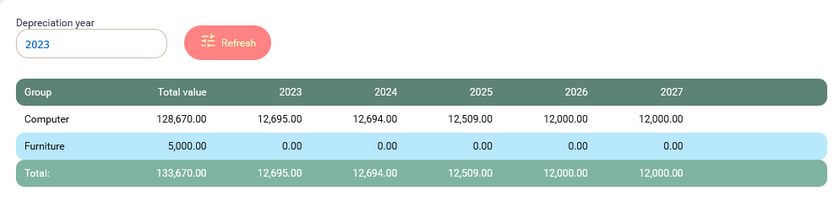
In case you want to find out how many assets are there within an asset group, click on the asset group and it will drill down to the asset level. The system will show you the depreciation for each asset.

Click on any of the asset row and the full depreciation schedule (for that particular asset) will appear on the screen.
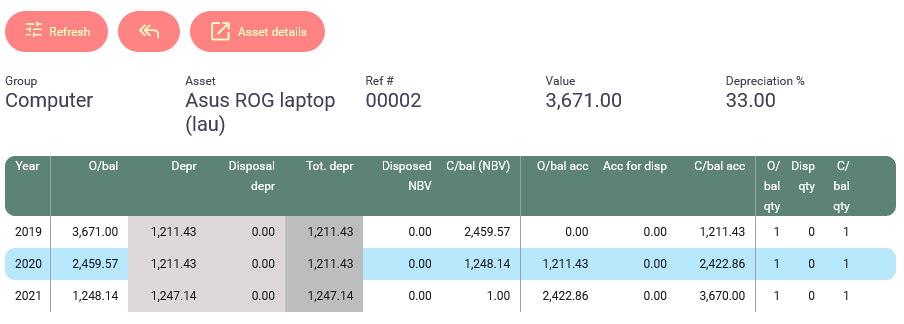
You may also want to view the asset detail, just click on Asset details button to view it.
To post yearly depreciation
Since the depreciation schedule has been taken care by the system, this make posting the yearly depreciation journal become very easy.
Here's the steps to post yearly depreciation:
-
Choose Depreciation option from the menu (on the left).
-
Choose the year of the depreciation that you want to post a journal entry.
-
At the top right corner, click on the three vertical dot icons and a popup will appear. Click on the “Post depreciation” option to post the depreciation to the Profit & Loss account by using a journal entry.

Here's a sample of journal entry which automatically generated by the system.
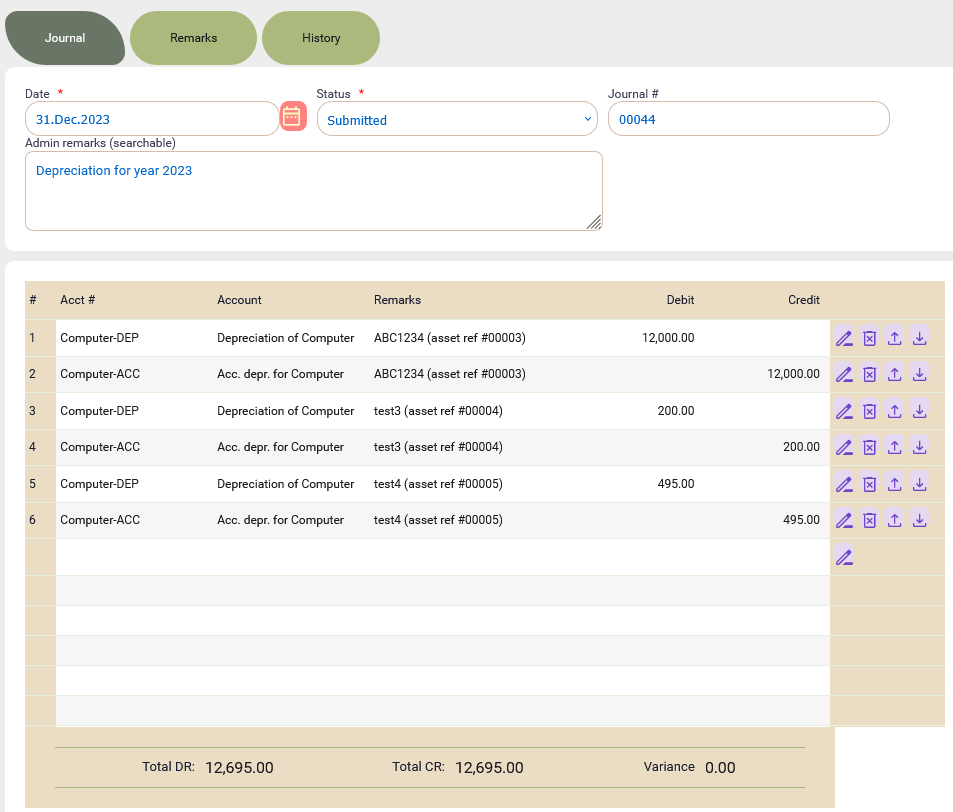
Basically, you don't need to calculate anything manually because all asset details has been captured and managed by BitzButler. We help you to extract the details and create the journal entry.
To dispose an asset
Our system can handle asset disposal as well. For example, if an asset has retired or is not functioning any more, these assets will have to be “disposed” or sold to another person.
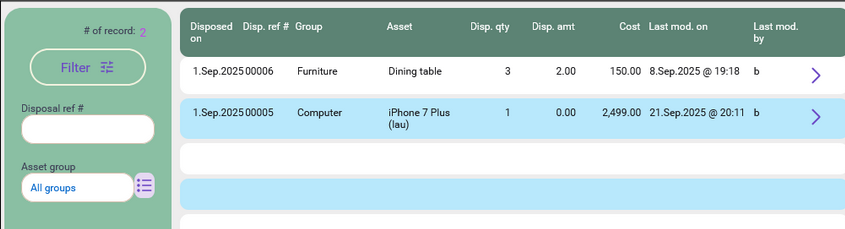
You will have to key in the details into the asset disposal entry screen and save it.
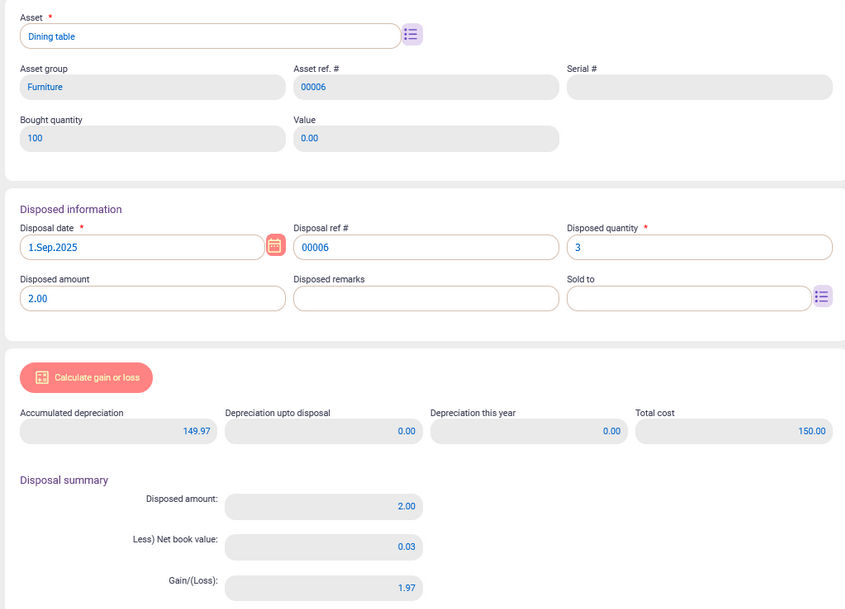
At the top right corner, click on the three vertical dot icons and then choose “Post depreciation” option. A journal entry will be posted. As a result, you don't need to manually calculate the disposal gain/loss and total depreciation value. You don't need to know what sort of details that is required to be entered in the journal entry.
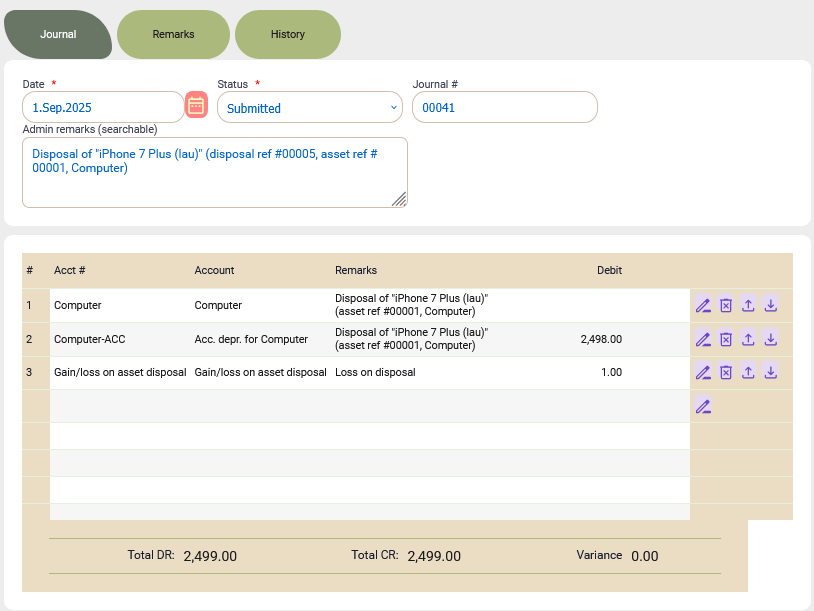
Here's an example of the journal entry for an asset disposal.
Summary
For security reason, the accountant may grant the permission to the staff and block others from accessing the asset register. This is useful when your account department has many staffs.
On top of that, any changes to the asset record will have an audit trail. It allows you to review what has been done to the asset.
Believe it or not, you don't need to be an expert in managing the asset any more. BitzButler helps you in organizing your asset, calculating the asset depreciation, asset disposal and posting journal entry. This is a time saver and a great step in enhancing your business operation.
Back to #News blog
Back to #Accounting blog
Back to #Asset blog
Back to #blog listing